Your house runs as one system. See how every part affects the others.
Your builder, solar installer and heating installer each focus on one part. EnergyFlow simulates how your building, heat pump, solar panels, battery, EV with V2H and pool work together, under your local weather, pool and driving schedules, and electricity tariff.
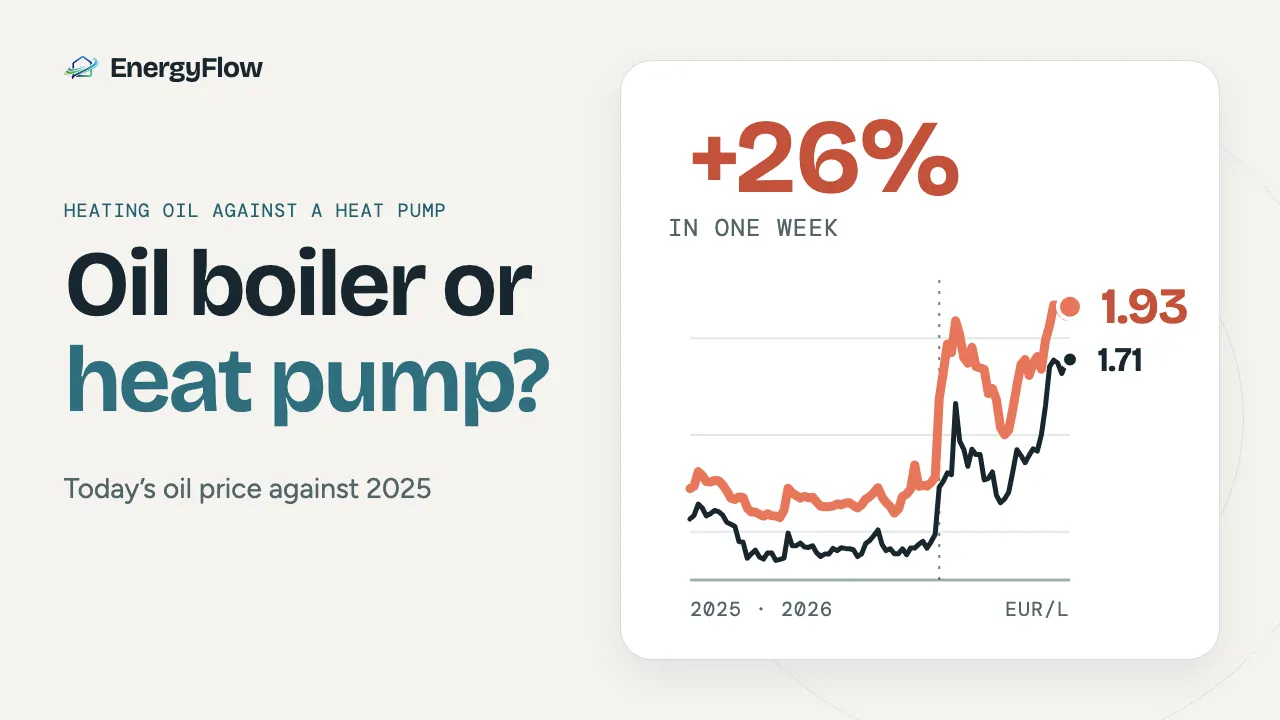
Heating oil costs 1.93 EUR a litre in France and 1.71 in Germany, and a heat pump looks like the obvious way to cut the bill. Would it still pay if oil fell back to its 2025 price? In France, yes, clearly: at the 2025 average the heat pump still saves 674 EUR a year, and it stays cheaper to run until oil falls to 0.62 EUR a litre, a little over half that average. In Germany the 2025 price leaves a saving of 188 EUR a year, a payback of 127 years even after the grant, so there the answer depends on oil staying high.
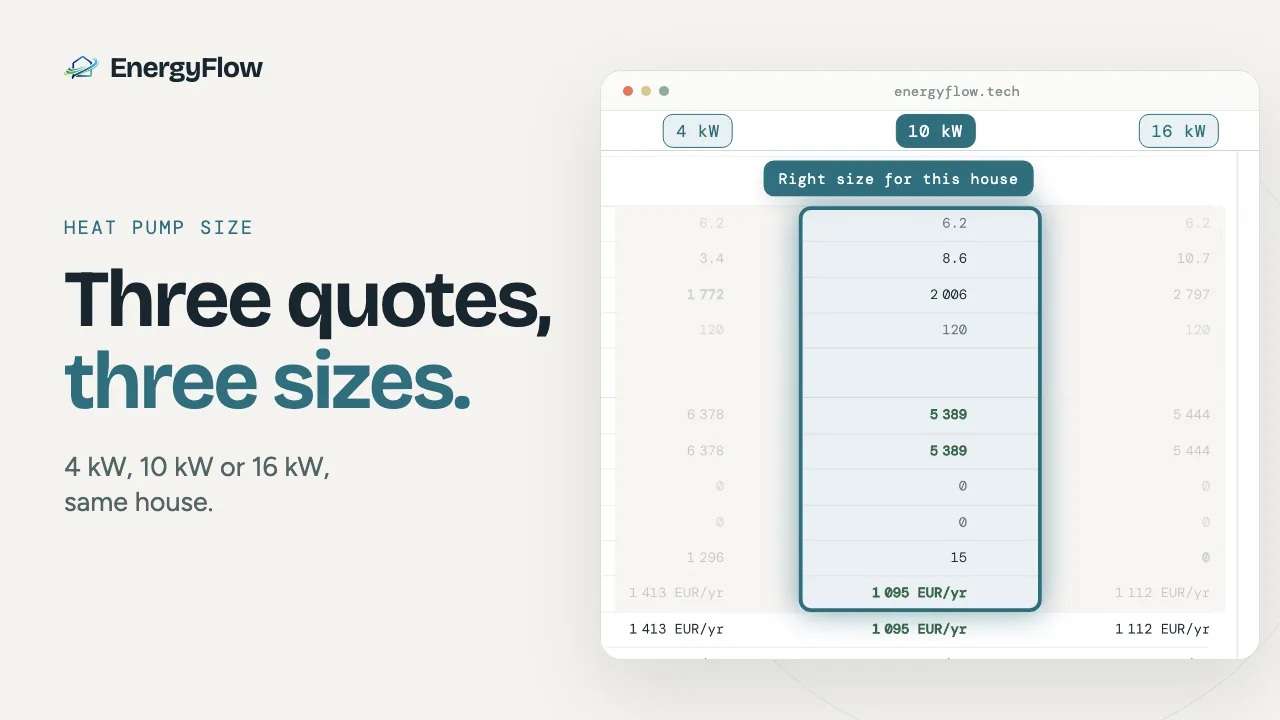
Barely: on a new house in Würzburg, a 16 kW heat pump used about 70 kWh (18 EUR) a year more than the 10 kW unit that the sizing proposed, and started about 40 percent more often. Too small is what costs money: a 4 kW unit cost about 320 EUR a year more, through its electric backup heater.
Comfort and cost depend on more than one piece of equipment. Begin with the issue you want to understand, then compare the relevant building and system choices.
Question 01↗
Hot summer, I need an AC, but how much electricity?
Look at solar exposure, glazing, shading and cooling choices together. A high energy rating alone does not answer how rooms behave during hot weather.
Compare your current setup, solar alone and solar with a battery. Match generation to your house's hourly demand and see what changes on the electricity bill.
Compare capacities and basic control with an energy management system (EMS) optimizer. Storing more solar and paying less are different goals, especially with dynamic prices.
Add your driving and home-availability schedule. Compare charging that meets your departure needs, then inspect solar self-consumption, grid imports and operating cost.
The pieces are sold separately. Your house runs them together.
Your builder looks at the building. Your solar installer sizes the panels. Your heating installer chooses the heat pump. Their advice helps with each part, but changing one changes what the others need to do.
A well-insulated house can still need cooling. When your car is home changes how much solar it can use. A pool adds heat demand and, indoors, another space that exchanges heat with the house. Change the tariff and the same equipment can have a different operating cost.
See the effect on the whole house before choosing each part.
Compare against a common baseline
See what changes when the heating system does.
Keep the building, weather, comfort settings and tariff consistent while you compare a system choice. That makes the reason for a difference easier to inspect.
EV charging, vehicle-to-home and pool heating depend on schedules, equipment and supported configuration. Each capability page explains what the model includes.
From the building to a comparison
Make the inputs visible.
A useful result starts with an understandable model. Review the building, set the system choices, then inspect how demand changes through the year.
Set the floors, zones, envelope and schedules that matter to the question.
02
Choose a system
Compare supported heating, cooling and electrical equipment options.
03
Inspect the results
Review comfort and energy by time period, with the assumptions close at hand.
A model has boundaries
Know what has been simplified.
EnergyFlow estimates how configured systems interact. It cannot resolve every construction detail, occupant action or local comfort effect. These are the assumptions to understand before using a result.
You do not need to draw every room corner or interior partition within a floor zone. The model works with configured zones and their thermal connections.
02
Interior walls are simplified
Their thermal effect is represented within the zone model instead of tracing each partition separately.
03
Glazed area follows wall and floor
Window area is assigned by exterior wall and floor. Orientation and shading shape solar gains. Exact window coordinates are not required by this simplified model.
04
Staircase airflow is simplified
The connection and opening between floors affect air mixing. Exact staircase position is outside the model, as are local drafts and pressure effects.
05
Stored heat and use schedules
Furniture mass is aggregated as heat storage. Occupancy and equipment schedules describe typical use through time, not live sensing of who is home.
EF
How to read a result
A simulation is an estimate with stated inputs.
EnergyFlow uses EnergyPlus for building thermal simulation and a separate dispatch stage for electrical flows. The model estimates energy use from the selected weather, equipment data and user assumptions. It does not certify a design or predict a measured bill.
Equipment performance uses documented manufacturer data where available. A detailed model-by-model catalogue is a possible future addition, not part of the current offer.
One-time pricing
Compare before you commit to equipment.
Single House: one house, five simulations, one PDF report. Full Project: unlimited simulations, scenario comparison, all reports and hourly data. Both cover all the equipment, pool and EV included. You pay once, with no subscription.
Can I enter building details without uploading plans?+
Yes. Set up the building and system with the supported manual inputs. This site does not claim that CPE or plan upload is available in the current public flow.
Do I need to draw every interior wall?+
No. Floors and thermal zones describe the spaces in the model. Interior partitions are simplified within those zones, so each wall does not need to be drawn separately.
Do windows need exact coordinates?+
No. Enter glazed area by exterior wall and floor, with orientation and shading. The simplified model does not require the exact coordinates of each window.
What can I compare in a scenario?+
Change a building or equipment choice while keeping the other assumptions consistent. Review modeled zone temperatures, delivered heating or cooling, equipment electricity and costs when a tariff is configured.
Are example pages completed simulation results?+
The current examples explain how to set up a comparison. They do not publish simulated savings or result figures without a saved run and its complete inputs.
Which equipment performance data are used?+
The standard equipment models use published manufacturer data where available. Data sources, reference conditions and any estimates should be stated with the relevant equipment. A detailed model-by-model catalogue is a possible later addition.
Will the modeled bill or room temperature match my home?+
Results are estimates based on the building, equipment, weather, schedules and tariff you select. They do not guarantee a future bill or the temperature in a particular room, and they do not certify a design or installation.
Can I include a pool or an electric vehicle?+
Pool heating, EV charging and vehicle-to-home are available in supported configurations. Equipment, schedules and package terms can limit the comparison, so check those details before relying on a result.